What You Can Expect During Your First Two Weeks With the ReadPartner Media Intelligence Platform

Your first two weeks with ReadPartner are the perfect time to explore the platform freely and apply it to real business challenges, from keeping teams aligned to analyzing trends for upcoming launches. This hands-on approach lets you test ReadPartner in real-world scenarios and experience how it supports fast, informed decision-making.
Getting started with ReadPartner
To get started with ReadPartner, navigate to https://readpartner.com/request-demo and request a demo. Our experts will get in touch with you to schedule a free, no-commitment experience of the ReadPartner Media Intelligence Platform tailored to your business and needs. We’ll showcase ReadPartner’s key features, guide you through setup, and help define your monitoring goals, ensuring the platform delivers the most relevant insights for your organization.
Once you have an account, you can start working with ReadPartner. In this article, we will provide a short overview of the main features, focusing on specific use cases, showing how you can benefit from full access and integrate ReadPartner into your business environment.
Main features and navigation
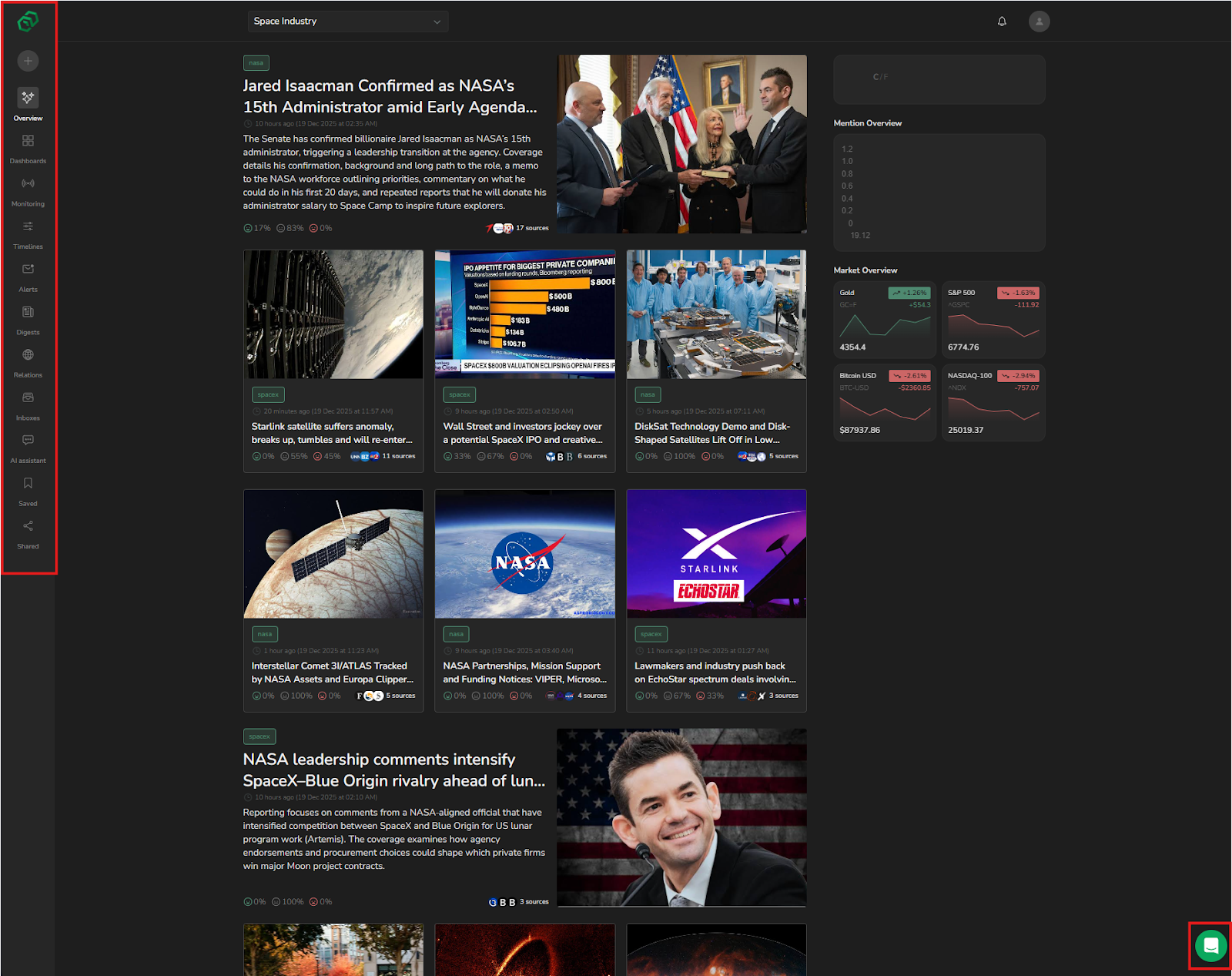
ReadPartner focuses on delivering a modern, clean interface with maximum ease of use. The main features of the platform can be found in the sidebar on the left.
ReadPartner also offers extensive documentation and a support chat built right into the platform. If at any point you are not sure how to do something or how something works, you can access both by clicking the chat button in the bottom-right corner.
Media monitoring
At its core, ReadPartner gives you the power to track and collect the most relevant updates across news outlets and social media platforms. Media monitoring is split into projects that allow you to configure monitoring for different needs. For example, one project can monitor your competitors, one can monitor your client base reactions, and one can monitor your marketing campaign performance.
Creating a media monitoring project
To start the process, click “+" in the sidebar on the left. Here, you can name the project, enter keywords to monitor and keywords to exclude, define Boolean logic for keywords, and select sources to scan for keyword mentions. This screen also offers team access configuration, where you can choose who can see this project.

Once you click “Create project”, the platform will start collecting updates and analytics according to your configuration.
Applying Media Monitoring
Use case: product launch monitoring
A product team wants to track reactions to a new product they are about to release. In this case, narrowing down the news you receive with keywords related to the product launch can be a great way to filter out everything else that is happening in the industry. For example, the team can set up a “Product Launch” project with a keyword configuration such as this one:
“BrandName” AND “launch” OR “ProductName” AND “review”This makes ReadPartner collect only those articles that directly report on the product launch or review the product, filtering out everything else. That, in turn, means that the product team is well-informed about how the product is received and is well-positioned to react to developments appropriately, be it misinformed statements published that need to be corrected before they spread, or positive coverage that needs to be highlighted and amplified.
Use case: managing your brand’s reputation
A company wants to maintain a strong and healthy brand reputation. Taking charge of one’s reputation always starts with awareness: to influence the perception of your company, you need to be aware of the current public discourse surrounding it.
The PR team can set up a keyword-based project to monitor brand, product, and leadership mentions across the board. Separately, the PR team can create another project to follow industry-related outlets to not only gather information on how the company is covered in the media, but also create a broader picture of the industry at large, identifying not only potential risks, but opportunities for positioning and messaging based on public sentiment and competitor action. As a result, the team will learn about important developments such as product reviews or industry shifts almost immediately, thanks to ReadPartner’s highly optimized news crawling algorithms. On top of that, ReadPartner’s AI model automatically analyzes collected news for sentiment, tagging them as positive, neutral, or negative, which can save a lot of time by providing an overall tone of the coverage without having to read the full article.
Dashboards
Dashboards provide visualized data, analytics, and overviews for your monitoring projects. Dashboards are highly configurable, ensuring you always have access to the data you need, without distractions. You can create multiple dashboards for a single project, allowing you to separate the analytics into groups and avoid clutter.
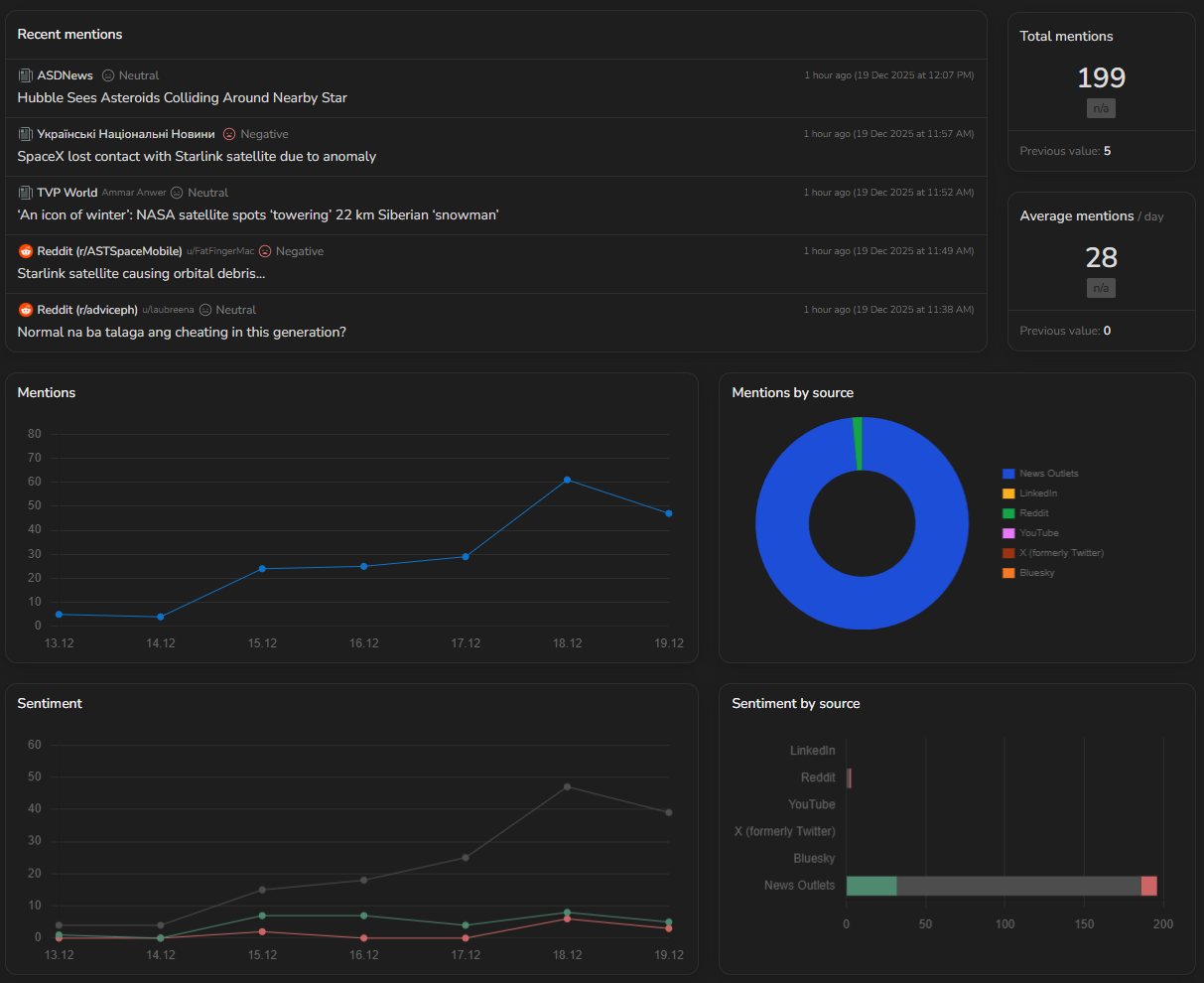
The display period can also be adjusted, from 24 hours to 30 days, allowing you to detect both short-term spikes and long-term trend direction.
Applying dashboard analytics
Use case: capitalizing on viral interest
A marketing team can set up a project to monitor market-relevant developments, then configure dashboards for this project. With analytics, they can watch trend shifts over short periods of time to look out for big spikes in attention. Noticing such a spike, the marketing team can capitalize on this increase in attention in multiple ways, depending on the situation:
- Launch a flash social media campaign to highlight the product’s relevance to the trend.
- Promote limited-time offers tied to the trending topic.
- Work with influencers or publications discussing the topic to improve reach.
The key element in capitalizing on viral attention is timing: the company needs to act quickly before this short-lived interest dies off. ReadPartner’s analytics allow users to notice attention shifts as soon as they begin, giving businesses time to prepare before the interest reaches its peak.
Use case: guiding strategic decisions
An electronics company sets up an industry-relevant news monitoring project and utilizes dashboard analytics. By observing keyword popularity shifts over long periods of time, the company can spot a steady increase in popularity of certain topics, for example, wearable health devices. Since this popularity increase is not a sudden spike, but a steady trend that keeps going, it indicates a growing consumer demand for such products. The company can then use this information to plan future product launches and marketing campaigns around the consumer interest and inform its sales force of this emerging demand. Additionally, the business could explore partnership options tied to this trend: for example, partnering with software developers to create a more compelling product.
Internal newsletters
ReadPartner’s internal newsletter system delivers regular news digests to selected team members via email. These news digests are based on monitoring projects created by the user, so they are fully customizable, ensuring that team members stay updated on the topics that are relevant to them.
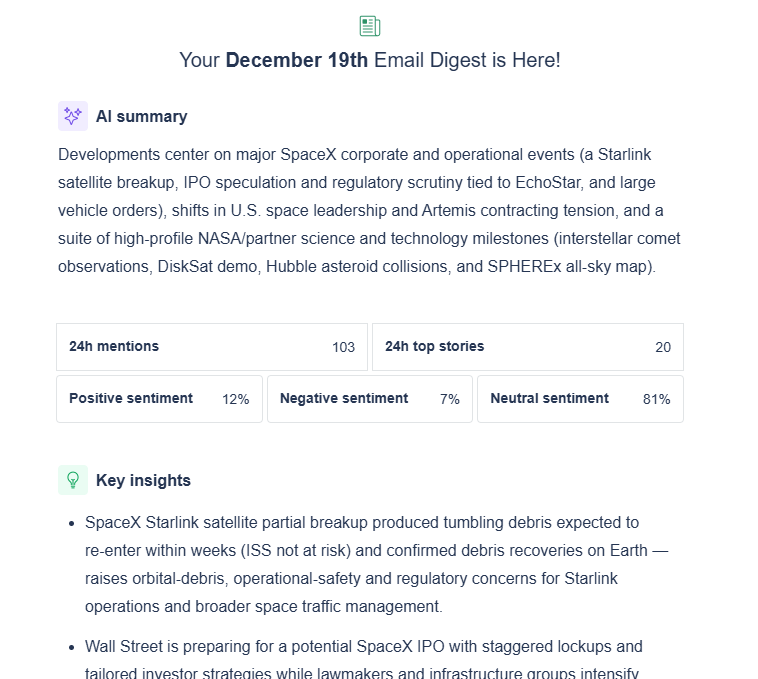
The digest contents are customizable; they can include different elements, such as an AI summary of the latest developments, analytics, key insights, or top stories overviews with links to original articles.
Applying Internal newsletters
Use case: keeping internal teams aligned
A business sets up an internal newsletter that delivers daily updates on media coverage of the company and its competition. Every morning, team members receive a summary of the top news, along with snippets of the articles. This keeps everyone, from executives to social media managers, informed without having to check multiple sources on their own. As a result, the team is able to plan campaigns, respond to breaking news in a timely fashion, and make decisions consistent with market realities.
Use case: supporting client-facing departments
A digital marketing agency works with multiple client brands, each covered across multiple media outlets. They set up internal newsletters for their account management team to provide them with daily or weekly AI-driven summaries of top news stories related to their clients. Even though account managers do not compose the recommended actions themselves, being kept in the loop allows them to discuss recent developments with the clients in a knowledgeable manner, providing context and reassurance and reinforcing client loyalty and trust, while bringing sensitive client mentions to the attention of marketing specialists quickly. This allows the agency to save a few hours of manual labor collecting and digesting the information, at the same time keeping the account managers well-informed and strengthening client relations.
Evaluating results
During the first two weeks of working with ReadPartner, the goal is not to measure the impact of media coverage or implement new strategies, but to determine how ReadPartner can aid your team’s decision-making. During this period, you can see how mentions are tracked across sources, how accurate sentiment analysis is, and what trends emerge, giving you a clear idea of what the platform is capable of.
You should also experiment with the report generation feature. Open any of your dashboards and click “Export to PDF” to receive a file that contains a presentation-ready report including elements based on your dashboard configuration, such as a news summary, trend data visualization, or suggested insights that can be acted upon. This allows you to test how data can be conveyed to leadership or teams.
Even if you do not act on every observation gathered during your first two weeks, it allows you to test “what-if” scenarios to understand how your team would respond to coverage or trends.
The beginning of your journey with ReadPartner is about exploring, testing, and tailoring the platform to fit your team’s workflow and goals. Our experts are always ready to help you learn and configure our media monitoring suite for maximum business impact.
FAQ
Is there a limit to how many users can join ReadPartner as a team?

The number of seats is defined by the plan of your choice, and it can be set to meet your needs. When your business grows, you can adjust the number of seats available to you at any time.
Is support during the first two weeks limited to chat, or is live onboarding available?
Live onboarding is available for all companies who request it during the free demo. Our team will get in touch with you as soon as possible, and help you take your first steps inside our platform.
Are ReadPartner’s reports customizable?
Yes, ReadPartner’s reports are fully customizable. You choose what elements to include from a wide range of available options, from AI overviews to detailed financial analytics.